Microsoft Copilot vs ChatGPT for Business (2026): Which Fits a Small Team?
Microsoft 365 Copilot or ChatGPT Business for a team of 2 to 300? Real per-user prices in USD, what each includes, where each works, and a worked 5-person example. From Microsoft's and OpenAI's own pages, checked 28 Oct 2026.
AI chat assistantsAI automation

No one paid for this, and it has no affiliate links. How we review.
Research-based overview: we have not tested this hands-on yet, so there is no score. Facts come from the makers' own pages, linked below.
On this page
- Verdict: it depends on whether you already pay for Microsoft 365
- What changed in 2026
- Free first: Copilot Chat vs ChatGPT Free
- Inside Word, Excel, Outlook and Teams
- Files, data and who can see what
- Privacy and admin
- What we checked, and what we haven’t tested
- Pros and cons
- Pricing, and a 5-person example
- Outside the US
- Which should your team pick?
- FAQ
Key takeaways
Verdict: it depends on whether you already pay for Microsoft 365
For a small team, the real question isn’t which chatbot is “smarter”. We haven’t tested that, and we won’t claim it. The question is where your team already works.
- If you already pay for Microsoft 365 and live in Outlook, Word, Excel and Teams: start with Microsoft Copilot. Copilot Chat is included at no extra cost with an eligible Microsoft 365 plan and a work account, and the paid Copilot plans put the assistant inside those apps. The catch: the better features need a paid Copilot plan, and Microsoft’s plan prices assume a yearly subscription that auto-renews.
- If you don’t use Microsoft 365, or want one AI workspace separate from your office software: look at ChatGPT Business. Standard seats are $20 per user a month billed yearly, or $25 billed monthly, with a 2-seat minimum.
- If you’re a 2-person team, ChatGPT Business’s 2-seat minimum fits you exactly, so the cost is $40 a month on yearly billing before tax.
- If you’re already on a Google Workspace plan, Microsoft Copilot won’t help with your Google documents. Look at ChatGPT Business, or at Gemini, which our ChatGPT vs Claude vs Gemini comparison covers.
In every case, run a short trial on real work before you commit to a yearly plan.
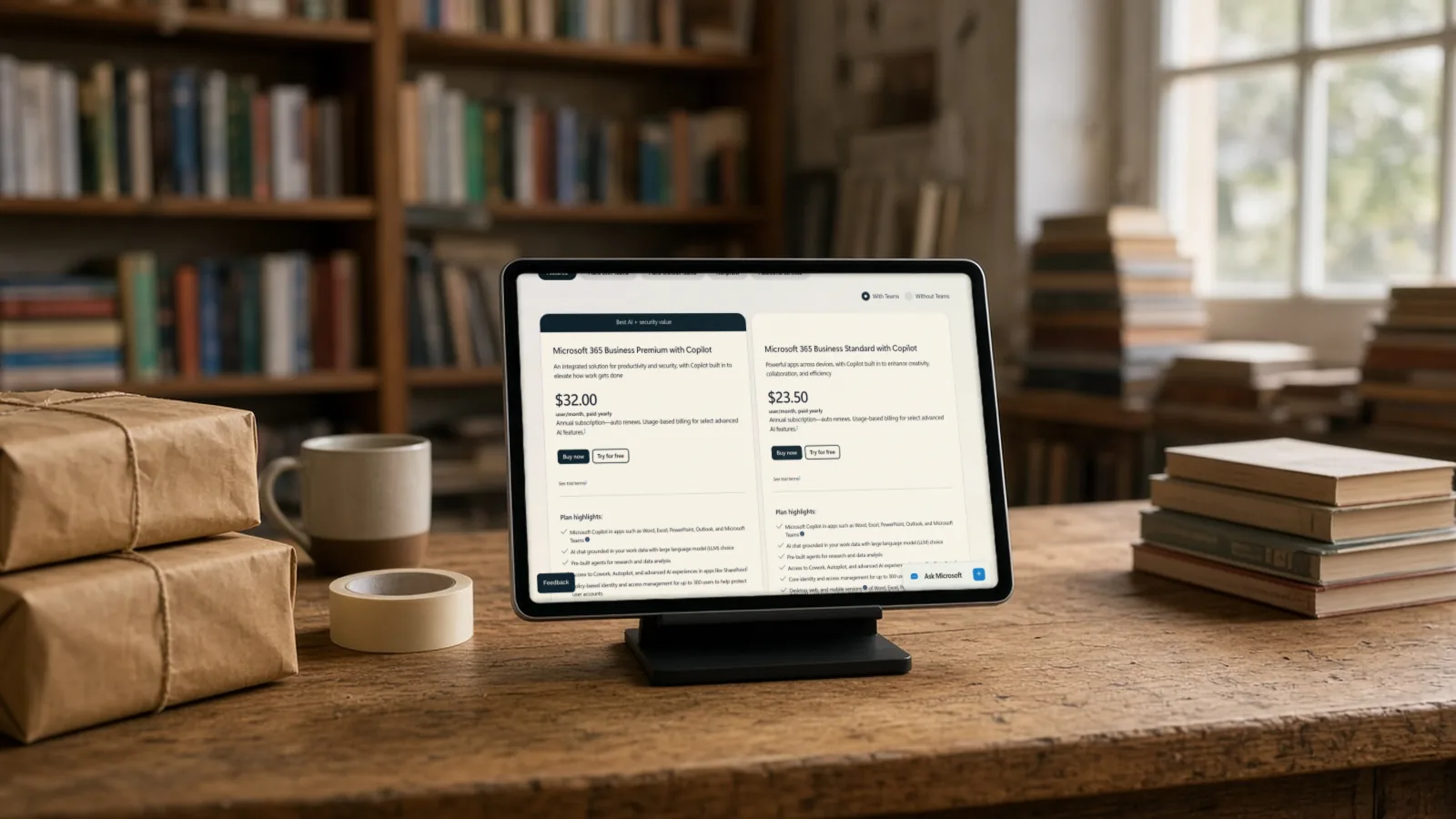
Research-based comparison. We have not tested these products hands-on yet. Everything below comes from Microsoft’s and OpenAI’s published pages, checked 28 October 2026. Cost note: Copilot Chat has no extra cost on an eligible Microsoft 365 plan, but the plans with Copilot built in start at $23.50 per user a month paid yearly. ChatGPT Business starts at $20 per user a month paid yearly, with 2 seats minimum. Prices are US dollars, before tax.
At a glance: team plans per user per month (USD)
| Tool | Cheapest way in | Team plan with the AI built in | Billing | Minimum |
|---|---|---|---|---|
| Microsoft Copilot | Copilot Chat at no extra cost with an eligible Microsoft 365 plan and a work account | Business Standard with Copilot: $23.50 paid yearly, $28.20 monthly. Business Premium with Copilot: $32 yearly, $38.40 monthly | Annual subscription, auto-renews (monthly option costs more) | Plans are for up to 300 users |
| ChatGPT Business | ChatGPT Free is for individuals; its price table does not list a Business trial (unconfirmed) | Standard seat: $20 per user a month billed yearly, $25 monthly. Premium seat: $100 yearly, $125 monthly | Monthly or yearly, by card | 2 seats |
What we checked
- Read Microsoft's Copilot Business pricing page, its Microsoft 365 business plans page and its Copilot Chat page on 28 Oct 2026, in both yearly and monthly views
- Read OpenAI's ChatGPT Business overview article and the ChatGPT pricing page on 28 Oct 2026
- Noted which ChatGPT prices the pricing page does not show, and left them out instead of guessing
- Worked out the cost for a 5-person office from list prices (our arithmetic, before tax and usage extras)
- Not done yet: signing in to Copilot Chat with a work account, or trying either product on a real document
What changed in 2026
Microsoft now sells Microsoft 365 plans with Copilot built in. Its page shows Business Standard with Copilot at $23.50 and Business Premium with Copilot at $32, per user a month, paid yearly. Separately it sells a “Microsoft 365 Copilot Business” add-on for people who already have an eligible Business plan. Its list price is $21 per user a month paid yearly. Microsoft shows a promotional price of $18 for the first year only. The conditions on that promo, from Microsoft’s footnote: it runs between 1 July and 31 December 2026, needs an annual commitment, applies to the first year only, isn’t available on trial subscriptions or combined with other offers, and Microsoft can change or cancel it. It’s for existing Microsoft 365 customers with an eligible Business plan, so a new customer can’t just pick it up. We use the $21 list price in our maths.
OpenAI renamed ChatGPT Team to ChatGPT Business on 29 August 2025. Its help article now describes two seat types, Standard and Premium. Premium costs $100 per user a month billed annually ($125 billed monthly) and, per OpenAI, gives 5 times more usage than Standard with no 5-hour usage limit. A workspace can mix both types. Both include ChatGPT, ChatGPT Work and Codex (OpenAI’s coding tool). If you run out of included usage, OpenAI sells workspace credits on a pay-as-you-use basis.
Free first: Copilot Chat vs ChatGPT Free
Copilot Chat is “available at no additional cost for all Microsoft Entra account users with an eligible Microsoft 365 subscription”, per Microsoft. An Entra account is a work or school sign-in managed by your organisation, so a personal Microsoft account isn’t the same thing. Copilot Chat is web-grounded AI chat. It can use agents, but agents are “priced on a metered basis” and need an Azure subscription, so a free chat can still lead to usage charges if you build agents. Microsoft’s Business Basic page also says that plan includes “AI chat with web grounding, writing assistance, and access to agents”.
ChatGPT Free is for individuals, according to OpenAI. It isn’t a team plan. If your staff use free accounts for work, that’s your policy decision. OpenAI’s Business plan is the one with workspace controls. OpenAI’s pricing page shows Go and Plus plans too, but it did not display their prices to us, so we don’t quote them.
Inside Word, Excel, Outlook and Teams
This is Microsoft’s strongest card on paper. Its pages say Copilot works in Word, Excel, PowerPoint, Outlook and Teams, with Researcher and Analyst agents plus Agent Builder and Copilot Studio for building your own. Microsoft says it can recap Teams meetings, catch you up on email and summarise chat threads, with some of those marked “Premium” on its Copilot Chat page. Microsoft says “select advanced AI features” are billed by usage, and its plan pages list “Cowork, Autopilot, and advanced AI experiences”. Microsoft’s Autopilot feature is Microsoft’s own name and has nothing to do with AIFix. Check what counts as usage before you roll it out.
ChatGPT Business works in its own workspace. OpenAI’s article lists GPTs (custom assistants), Projects, Apps, Company Knowledge, ChatGPT Agent and Deep Research. ChatGPT also has extensions for Excel, Word, PowerPoint and Google Sheets. OpenAI’s pricing page shows them as limited on Free and Go, included on Plus and expanded on Pro. It doesn’t say what you get on Business, so that’s unconfirmed. We found no meeting-recap feature on the pages we read. For meeting notes in any setup, see Otter vs Fireflies vs Fathom.
Files, data and who can see what
Microsoft says Copilot Chat “inherits all your existing Microsoft 365 security and compliance requirements, so only people with the right permissions can access the content it generates”, and that data resides in your geographical region. That’s an advantage if your files are already in SharePoint and OneDrive.
OpenAI’s help article says “OpenAI won’t train on your workspace’s data” for Business. Its pricing page says data is encrypted in transit (TLS 1.2) and at rest (AES-256). Business is a self-serve plan. If you need invoice billing, purchase orders, a signed BAA (a healthcare data agreement) or Zero Data Retention, OpenAI says to use a contracted plan such as Enterprise instead.
Privacy and admin
- Microsoft: uses your existing Microsoft 365 admin centre and licences. Plans cover up to 300 users. A one-month trial needs a credit card and, per Microsoft, converts to a paid subscription automatically unless you cancel. Microsoft’s footnote on the add-on offer also mentions a 7-day cancellation window for a prorated refund; check whether it applies to your plan.
- OpenAI: workspace credits for extra use, and a card as the payment method for Business. We didn’t read the admin screens, so check what controls you get. We haven’t found a trial for Business in the article we read.
- Pricing by country: OpenAI says pricing may vary by country and currency. Microsoft’s prices we quote are the US page.
What we checked, and what we haven’t tested
We read the pricing and plan pages in both yearly and monthly views. We haven’t signed in to either product. When we test, we plan to stay on free tiers only:
- Sign in to Copilot Chat with a work account and ask the same five office questions we give ChatGPT Free, and compare features, not “quality”.
- Open a real Word and Excel file in each, to see what each can read and edit.
- Look at the admin screens we can see without paying.
- Check what Copilot Chat shows for agents, since they’re metered.
The Copilot one-month trial needs a card and converts automatically, so we haven’t started it.
Pros and cons
| Microsoft Copilot | ChatGPT Business | |
|---|---|---|
| Pros | Copilot Chat at no extra cost with an eligible plan; works inside the Microsoft apps your team already uses; data stays in your Microsoft 365 setup | Standalone workspace that doesn’t depend on any office suite; clear two-seat price list; Premium seats for heavy users |
| Cons | Better features need a paid plan priced for an annual commitment; agents and some features are metered; the cheapest promo is only for existing customers | Doesn’t live inside Word or Outlook in the way Copilot does (Office extensions unconfirmed on Business); 2-seat minimum; card billing only on self-serve |
Pricing, and a 5-person example
Prices are US list prices in dollars before tax, checked 28 October 2026.
| Plan | Paid yearly | Paid monthly |
|---|---|---|
| Microsoft 365 Business Basic | $7.00 per user | Unconfirmed |
| Business Standard with Copilot | $23.50 per user | $28.20 per user |
| Business Premium with Copilot | $32.00 per user | $38.40 per user |
| Copilot Business add-on (list) | $21.00 per user | $25.20 per user |
| ChatGPT Business Standard seat | $20 per user | $25 per user |
| ChatGPT Business Premium seat | $100 per user | $125 per user |
Our maths for a 5-person office, paid yearly, per month:
- Business Basic ($7 × 5): $35.
- Business Standard with Copilot ($23.50 × 5): $117.50.
- Business Basic plus 5 ChatGPT Standard seats ($35 + $20 × 5): $135.
- Standard with Copilot plus 5 ChatGPT Standard seats ($117.50 + $100): $217.50.
These exclude tax, Copilot’s usage-based extras and ChatGPT workspace credits. Basic and Standard are different plans: Basic gives web and mobile versions of the Office apps, and Standard adds the desktop versions. So the $135 and $117.50 options don’t give you the same software. Compare features, not only the totals.
The monthly option costs more per user for both products. For the same 5 people on Standard with Copilot, Microsoft’s monthly price would be $141 ($28.20 × 5), against $117.50 yearly.
Outside the US
Prices here are US list prices in dollars. Microsoft and OpenAI both show local currency, and sometimes different prices, in other countries, and tax is added at checkout. OpenAI says pricing may vary by country. Before you sign, open each pricing page from your own country. Data location matters too. Microsoft says Copilot Chat’s data resides in your geographical region. We haven’t checked which regions are covered.
Which should your team pick?
| Your situation | Start with | Why |
|---|---|---|
| Already on Microsoft 365 and live in Outlook and Teams | Microsoft Copilot | The assistant sits in the apps you already use |
| Team on Google Workspace | ChatGPT Business, or see Gemini | Copilot doesn’t help with Google files |
| 2-person team, no office suite | ChatGPT Business | $40 a month yearly for 2 seats; no need to buy an office suite |
| 50 people, Teams meetings every day | Pilot Copilot in Teams with 5 to 10 people | Per-user pricing and metered agents add up quickly, so test before rolling out |
If you want the AI to do more than answer questions, such as connecting your inbox, calendar and CRM, you can have AIFix set up AI automations for your team. That’s our own service. For do-it-yourself tools, see n8n vs Make vs Zapier. For OpenAI’s earlier team-tasks update, see ChatGPT Team’s tasks feature.
FAQ
Is Microsoft Copilot Chat really free?
It’s at no additional cost for Microsoft Entra account users with an eligible Microsoft 365 subscription, per Microsoft. You still pay for the Microsoft 365 plan, and agents are metered and need an Azure subscription.
Can ChatGPT Business work with Outlook?
ChatGPT lists extensions for Excel, Word, PowerPoint and Google Sheets on its pricing page, and Outlook isn’t named there. What you get on the Business plan isn’t shown, so confirm in a trial.
What’s the minimum number of ChatGPT Business seats?
Two. OpenAI says a workspace needs at least 2 Standard or Premium seats in total, and one of each also counts.
Does ChatGPT Business train on our data?
OpenAI’s help article says it won’t train on your workspace’s data. Microsoft’s pages describe enterprise data protection and in-region data for Copilot Chat. Read each company’s terms for your own situation.
Can we mix Microsoft Copilot and ChatGPT?
Yes, they’re separate subscriptions, and the 5-person example above shows the cost of both. Mixing means two bills and two sets of admin settings, so check whether your team really needs both.
Is monthly or yearly billing better?
Yearly is cheaper per user on both. Microsoft’s prices assume an annual subscription that auto-renews. Monthly costs about 20 to 25 percent more, and gives you the freedom to cancel. If you’re unsure whether the team will use it, start monthly or on a trial, then switch to yearly.
Sources
- Microsoft 365 Copilot for business: pricing and plans, Microsoft (checked 28 Oct 2026)
- Compare all Microsoft 365 business plans, Microsoft (checked 28 Oct 2026)
- Copilot Chat, Microsoft (checked 28 Oct 2026)
- ChatGPT Business overview, OpenAI Help Center (checked 28 Oct 2026)
- ChatGPT pricing, OpenAI (checked 28 Oct 2026)
- AIFix Automation, AIFix (checked 28 Oct 2026)
This post was drafted with help from an AI assistant, then checked, edited and approved by Numan Malik.
Numan Malik, Founder, AIFix. Reviewed and approved by Numan before publishing. More about Numan · Editorial policy